🏷️ Name tags
Learning Objectives
We don’t all know each other yet!
There should be blank name tags and pens in the room you’re in. Make a name tag for yourself and put it somewhere people can see.
Feel free to put whatever you’d like on your name tag. Make sure to include whatever name you’d like people to call you!
🔋 Energiser!
Learning Objectives
Energisers are a big part of MigraCode’s culture! Even as adults, we all feel a bit shy and uncertain when we join a new group. But when we let ourselves be silly together, we start to feel more at home.
Here follows one energiser for in-person and one for online.
🗂️ Options
In person: Zip Zap Boing
⚡ Zip Zap Boing!
Learning Objectives
👉 Zip Zap Boing Gameplay
In a single group, have participants stand in a circle. This game works best with 5 or more players and must be played in person.
Make your zipzapper
Press your hands together in front of you, palms facing each other to make your energy zipzapper. Crackle! Feel the energy between your hands!
Point your zipzapper to the person next to you, and say “Zip”.
Point your zipzapper at anyone in the circle and say “Zap”.
Now, put both hands up in the air, jump, and say “Boing!” This reverses the direction of play.
Play the game
One person starts by saying “Zip” and pointing to another person in the circle. That person then has three options:
- Zip the person on your left or right.
- Zap anyone in the circle.
- Boing the energy back to them, which reverses the direction of play.
The game continues with players reacting quickly to keep the energy flowing.
If someone hesitates or makes a mistake, they’re out.
Evolve the game
Add variations to increase complexity and challenge
- Round 2: Add a new word “Zop” which skips the next person in the circle
- Round 3: Players must use a different gesture for each word (e.g., point for Zip, thumbs up for Zap, jazz hands for Boing)
- Round 4: Increase the speed - anyone who takes more than 2 seconds to respond is out
🎡 Morning orientation
Learning Objectives
Planning during the week
👣 To Do
🎙️ The Facilitator will:
- Assemble the entire group (all volunteers & all students) in a circle
- Briefly welcome everyone with an announcement, like this:
💬 “Morning everyone, Welcome to another Saturday at MigraCode, this week we are working on Module X Sprint 3 and we’re currently working on {summarise what the topic of the week is}”
- Now check: is it the start of a new module? Is it sprint 1? If so, read out the success criteria for the new module.
- Next add one thing you hope to find out or learn about today.
⏰ The Timekeeper will:
- Announce the start of an activity and how long it will take (check everyone is listening)
- Manage any whole class timers that are used in an activity
- Give people a 10-minute wrap-up warning before the end of an activity
- Announce the end of an activity and what happens next
🗺️ Using the curriculum
Learning Objectives
At MigraCode, the curriculum maps out what you will learn together over the course. It defines your weekly work, the preparation you must do before class and what you will do together on class days. Use this time to go through the activities and learn how to navigate the curriculum interface. Let`s check out how this works.
🫖 Morning Break
A quick break of fifteen minutes so we can all concentrate on the next piece of work.
⚠️ Disclaimer
📝Note
This exercise is hosted on the GitHub repository of our partner NGO, Code Your Future (UK), and not on a MigraCode-owned repository. We are part of a European network where we share resources and support each other as we share the same mission - to provide free, high-quality tech education to our communities.
The exercise works as intended — you are free to fork and clone the repository as usual, if required by the exercise. However, please do not make any pull requests to the original Code Your Future repository.
Lastly, if there are any mentions to CYF Slack channels please write a message into our MigraCode class channel instead.
🕶️ Developer Glasses Workshop
Welcome, everyone. This workshop is your first set of technical “glasses” — you’ll learn to see a website like a developer. That means using curiosity and observation to understand how interfaces work and where to find information.
⚠️ Note: Once you start seeing like a developer, you can’t unsee it! You might find it harder to look at websites as a regular user — which is, ironically, who we design them for.
📌 Link to exercise
⚙️ Requirements
This workshop runs entirely on GitHub.
You will need:
- A GitHub account
- Internet access
That’s all — it’s beginner friendly. Before starting, make sure you can access the repository above.
Form groups of up to five people, and set a timer to keep track of time.
✍️ Exercise 1 – Eat Me, Drink Me (10 min)
Start by finding and reading the README file.
Ask yourselves:
- Where is the
READMElocated? - What’s its purpose?
- What’s the repository about?
💡 Key takeaway: Don’t skip over text. Read it carefully — it often holds the answers.
✍️ Exercise 2 – You’ve Got Issues (20 min)
Next, explore the Issues tab. All your coursework is managed there, so understanding it is essential.
Try the following:
- Find where issues are listed.
- Look at the labels — what story do they tell about how work is organized?
- Hover over labels to reveal extra info.
- Create a new issue: what options do you notice (assignees, labels, templates, etc.)?
- Make sure you understand what the repository’s goals are. How can you find that out?
- Look at the deployed site to identify what might be wrong or missing.
Challenge: Can you figure out who decides what the labels mean?
Check discussions, docs, or existing issues for hints.
End by sharing one key takeaway from your group.
✍️ Exercise 3 – Pull Requests (20 min)
Time to explore how code changes are tracked and discussed through Pull Requests (PRs).
Move slowly and read every part of the PR interface together.
Focus on:
- Where can you see all PRs in the repo?
- Open one PR and read it from top to bottom.
- What’s the story behind it? What changed — and why?
- Where can you view the file changes?
- How can you filter them?
- Where is the conversation happening (comments, reviews)?
Write down one insight or question that stood out.
✍️ Solo Challenge – Hidden Powers (5 min)
Now explore on your own. Play, click, test.
Try these shortcuts and tricks:
- What happens when you press
/ort? - Can you find other keyboard shortcuts?
- What search tools are available?
- How can you instantly find a word on the page?
Wrap up by sharing your most surprising discovery with your group.
📝 Final Thoughts
There’s no single correct path through this workshop — the goal is to develop your own way of exploring and understanding interfaces.
Stay curious, keep experimenting, and share what you learn with others.
That’s how developers see the world — one insight at a time. 🌱
🍽️ Lunch
At MigraCode, there will be scheduled community lunches throughout the year during which all of MigraCode team will joing and would like to invite you to eat with us. The MC team will let you know when the upcoming community lunch will be. Bring your home-cooked food or buy some food across the street at Glories (e.g., at the Carrefour Supermarket or pick up some to-go meal from one of the restaurants there). We share our time, food and our stories. We learn about each other and the world. We build community.👭👬
On days where there is no community lunch planned you can still stay to socialise here and use the terrace to meet you peers and connect (this goes especially for class days that are longer than just until 2pm.)
Adevinta allows us to use their beautiful space, cutlery, plates, microwaves etc - please make sure to leave everything exactly as it was before so they keep lending their precious space to us ☺️. Ah and make sure to check out the foosball table on the terrace.
🚧 Sharing Our Blockers
Learning Objectives
We call problems that stop our progress “blockers”. We talk through our blockers regularly and help each other get “unblocked” or “unstuck”.
🕹️Sharing Our Blockers
Join our Jamboard here and add your blockers.
Make sure to add only one blocker per note.
Facilitator Once everyone has added their blockers, group similar blockers together.
Facilitator Next, discuss the blockers and help each other get “unblocked”. Start with the most common blocker and work your way down the list.
Hints and Tips
Example Blockers
- I can’t find a Slack channel people keep mentioning.
- People tell me I should be replying to a Slack message in a thread, and I don’t know how.
- I can’t open a PR, because…
- How do I fix extra stray files in my PR?
- I don’t have a computer so I can’t complete my work!
- How do I run Lighthouse?
- Everyone should have blockers. If you aren’t blocked on anything in the course, do you need to challenge yourself more?
- Ask “stupid” questions. Your question is not stupid! What we are doing is hard, and everyone has questions. If you’re stuck, it’s likely that someone else is too. Please help others and ask your question!
- If you have other more advanced questions, do write them on the board but don’t expect to answer them in Blockers. We will work on those in study group.
🫖 Afternoon Break
Please feel free to grab some coffee or tea.
🧑🏿🔧 Study Group Development
Learning Objectives
This time is set aside for you to work together in small groups to make progress on your coursework and objectives. You should have brought at least one ticket from your backlog to work on and ideally have prepared at least one question to get mentor support on.
You can also choose to do structured activities to consolidate your objectives for this sprint. Your learning journey belongs to you. Think about what you need to do to achieve the objectives for this sprint and how you can use this time to work towards them.
If you are working on a Pull Request, this is a great time to get real time code review from your peers and mentors. Remember to use the GitHub interface to comment on the code and ask questions so your work can be tracked.
🗂️ Options
Optional structured activity: Pomodoro
🍅 Pomodoro
Learning Objectives
Each group member, take a small-scoped piece of work from your backlog. Set a timer for . Use this focused time to complete your ticket and open a PR.
⌛ Time’s up! Take a break! Make a cup of tea. Walk around a bit.
Now set a new and review each PR as a group.
⌛ Time’s up! Take a break! Make a cup of tea. Stretch! Look at how much progress you made in one hour. ✨
Optional structured activity: Pair Programming
🧑🏿🔧🧑🏿🔧 Pair programming
Learning Objectives
- Switch between driver and navigator roles after
- The “driver” is the person typing on the keyboard, just thinking about what needs to be written
- The “navigator” reviews what the driver is doing and is thinking about to write next
- Don’t dominate - this is teamwork
⌛ Time’s up! Take a break! Make a cup of tea. Good job, partners!
Bikes for Refugees Project
🔗 Bikes for Refugees Project
Bikes For Refugees
Fun fact, Bikes For Refugees is a real project, and bootcamp grads from the UK have worked on apps for it for their Final Projects.
Set up
- Clone this repository onto your machine. You can use this video guide to refresh your memory if you’re stuck.
- Open up the repository you just cloned using VSCode.
- Make a new branch
You’re now ready to code!
Exercise
The aim of the exercise is for your webpage to look like the following screenshot:
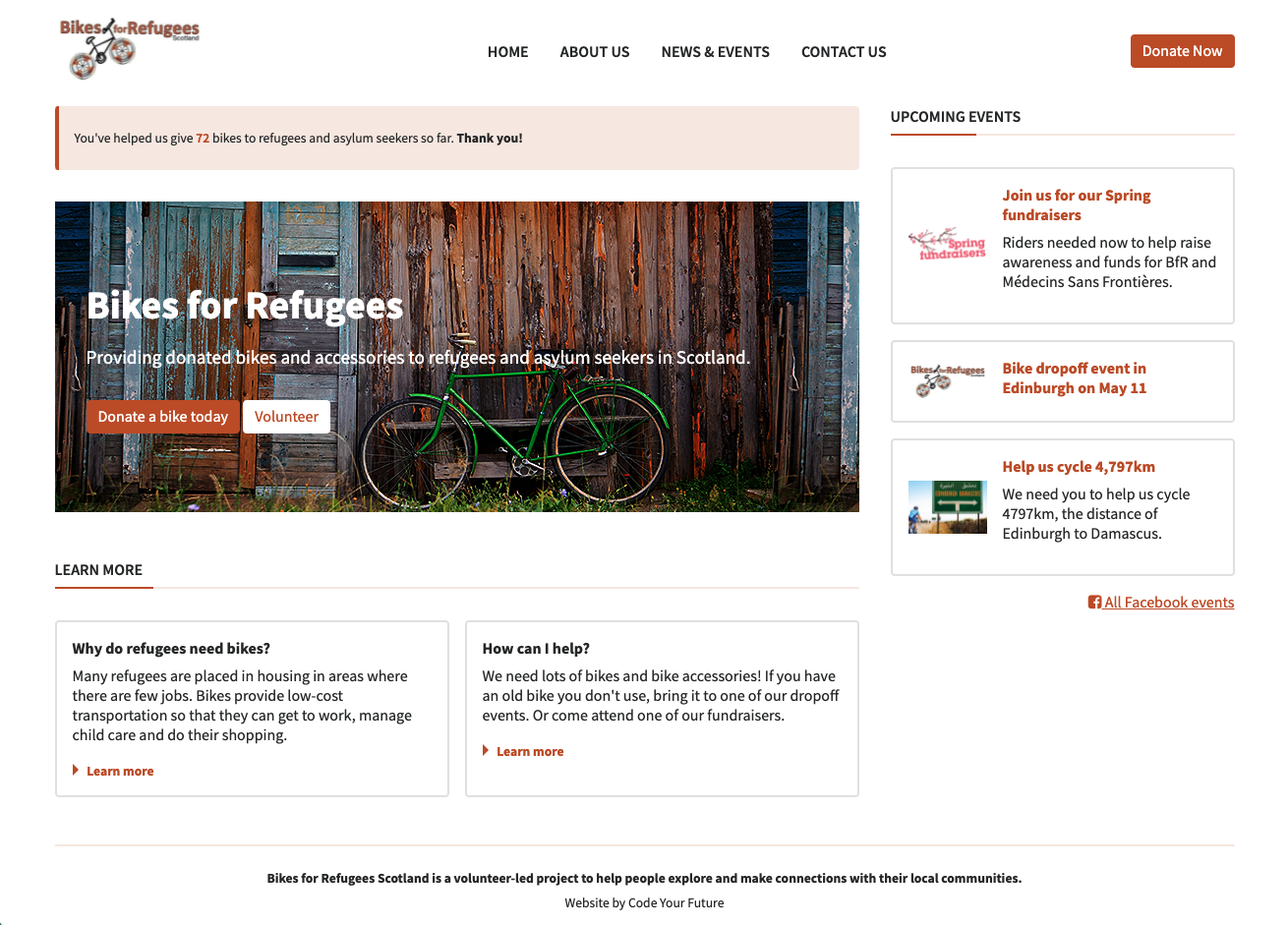
Open the index.html file in your browser, and compare it to the image of the final result. What’s different?
Exercise 1) Use semantic markup
Open up Devtools and choose the Accessibility tab next to Layout (or behind the » chevrons). Now start to replace the <div>s with semantic HTML tags. The visual render looks the same, but the API interprets the semantic HTML totally differently. Semantic HTML does stuff!
Exercise 2) Fix the broken images
Some of the links to images are broken. The images you need are in the images folder - please replace any broken image links with the correct paths.
It’s also good practice to include a description of the image in the alt attribute.
Make sure to add some CSS to make the images look like the design.
Exercise 3) Style the buttons
There are 3 buttons on the page: can you style them like the design? Remember, re-use styles as much as possible by using CSS classes.
Exercise 4) Add spacing
- Add more space inside the hero section so that more of the image is visible.
- Add more space below the hero section to move the ‘Learn more’ section down.
- Use the
paddingproperty to add some more horizontal space between the navigation links in the header.
Exercise 5) Fix the positioning
Compare what you can see in your browser with the design provided. Can you spot the differences in layout? Use CSS Flexbox or Grid to move elements around so they are positioned correctly.
Also add borders and spacing if required to match the design.
Bonus: hover effects
Add a hover effect using CSS, so that:
- The links in the top menu navigation become orange on hover
- The colours of the buttons are inverted on hover
Submit your work
Once you’ve finished, open a pull request and follow the instructions in the backlog.
🎉 Wrap
You are done for the day. Take a moment to reflect on what you have learned and achieved.
Stand in a circle and share:
- 📛 your name
- 💪🏽 one thing you achieved today
- 👷🏾 the task you are going to work on next
- 🛟 one thing you need help with
Give yourselves a round of applause. Now you have earned your rest. Usually people go for a cup of tea or a pint after class. You are welcome to join and wind down together.
☕ Optional: Socialise!
Learning Objectives
At MigraCode we learn as a community. You’re going to be spending the coming months with the people around you. After that, they will form part of your professional network too.
We encourage you to spend time getting to know them! This is optional. But after class, we encourage you to do something like:
- Go sit in a nearby park together.
- Go to a local cafe for hot drinks.
- Go to a nearby bar.
- Or any other ideas you have!
Make sure everyone who wants to join in will feel welcome wherever you go (e.g. a lot of people might not like drinking or being near alcohol).